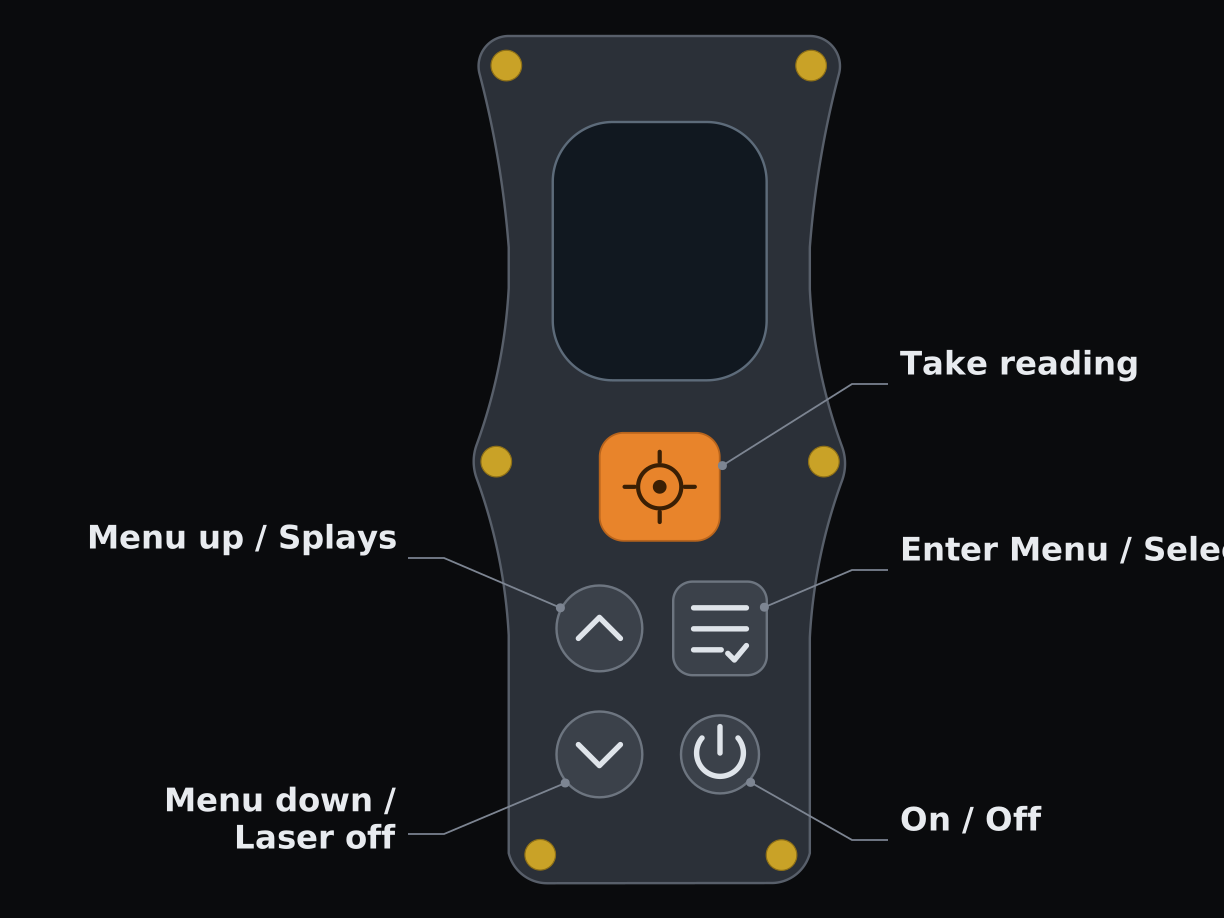
Orange trigger — high-accuracy shots. The first press wakes the laser so you can aim; the second takes the shot.
Up — short press: take a splay shot. Hold for ~1.5s: toggle Disco mode.
Down — turn the laser off between shots to save battery. The trigger brings it back.
Menu — open the settings menu.
Power — press to turn the device on or off.
In menu mode, Up and Down scroll and either the orange trigger or Menu selects. The power button still turns the device off.
Hint · The power button is also the reset button
If the device software ever crashes, hold the power button down for 3 seconds. That cuts power in hardware, no matter what the firmware is doing — press it again to start back up.
Hold at power-on
Holding a button while the device starts up gets you to the recovery routes:
Down — boot straight into USB drive mode, even if the settings file is unreadable.
Down + Menu — storage factory reset. You're asked to confirm; hold the trigger for 3s to erase. This wipes settings, calibration and any unsent shots, so it's the last resort.
The DiscoX has four buttons.
1
Measure
menu: up
2
Measure
menu: down
3
Menu
menu: select
4
Power
on/off
In normal mode
Button 1 (Top) — take a measurement, or wake the laser if it's timed out.
Button 2 — short press: take a measurement. Hold 2s: toggle Disco mode.
Button 3 — open the settings menu.
Button 4 (Bottom) — power on/off.
In menu mode, Buttons 1/2/3 become scroll-up, scroll-down, and select. Button 4 still powers the device off.
02 · Field operation
Taking readings
Once set up the DiscoX is a simple point-and-shoot device. The large orange button triggers high-accuracy shots: press it once to wake the laser and aim, then press again to shoot. The device checks it is being held steady (LED turns red) before taking the shot (LED turns green) — so hold it still until the shot lands.
To save battery, and to show you the shot worked, the laser turns off after every high-accuracy shot. The next press of the trigger turns it back on for aiming.
LED states
RedChecking you're steady — hold the device still.
GreenShot taken and saved.
PurpleStation recognised — three shots agreed.
Splay shots
The up button takes splay shots. These skip the stability check, so they are not as precise as shots taken with the orange button, but they are much faster to take — and the laser stays on afterwards so you can fire off the next one straight away.
Splays don't count towards station detection, so a run of splays between stations never interferes with your legs.
Turning the laser off
To turn the laser off between shots press the down button. It only ever turns the beam off — a stray press underground can cost you a re-press, but it will never light the laser unasked. The orange trigger brings it back. The laser also switches itself off after the laser timeout (2 minutes by default).
Stations
If 3 shots are taken at the same target 3 times in a row, the device registers this as a station: it flashes white, plays a rising fanfare, blinks the laser, and then lights up purple. Shots count as the same target when their end points fall within the leg tolerance of each other (10 cm by default — Menu → Settings → Leg tol).
The display stays frozen on the reading until you take the next shot.
Sounds
The buzzer has a different sound for each event, so you can survey without looking at the device:
Click — shot started.
Bleep — reading taken and saved.
Rising fanfare — station recognised.
Falling womp — something went wrong, check the screen.
Rejected shots
Very dark or shiny targets can bounce back too little light for the laser to trust the distance it measured. Rather than record a plausible-but-wrong number the DiscoX rejects the shot and plays the error tone — re-sight onto a better target, or put something matt where you're aiming.
Press Button 1 or Button 2 (short press) to take a reading. The device waits until the sensors have settled before accepting a shot — hold the device still during readings.
LED states
RedStabilising — hold the device steady.
GreenStable — shot recorded and sent.
PurpleLeg detected — three beeps confirm.
After a shot the display freezes on the recorded reading and the laser turns off. Press any measure button to re-enable the laser, then press again to take the next reading.
Leg detection
When three consecutive shots agree in bearing, clino, and distance (within configurable tolerances), the DiscoX recognises a complete survey leg. The LED pulses purple, the laser flashes briefly, and the buzzer beeps three times. The display stays frozen on the leg data until you press a measure button to continue.
Laser wake
If the laser has auto-timed-out, pressing any measure button re-enables it with a short beep before taking the shot.
03 · On-screen
Display
The OLED display shows three values from your most recent stable shot:
Distance (top) — in metres, to two decimal places.
Azimuth (middle) — compass bearing, in degrees.
Inclination (bottom) — clino angle, in degrees.
The top-left shows BT when Bluetooth is connected, with a count of pending (unsent) readings beside it. The top-right shows a proportional battery bar. If the device is set to measure from the front this is indicated at the top of the display as well.
04 · Why not
Disco mode
Hold the up button for about 1.5 seconds to toggle disco/rave mode. The laser shuts off and the LED cycles through colours. Shake the device for faster colour cycling and full brightness.
To get back to surveying, press the orange trigger — or hold the up button again to switch disco off where it stands.
Hold Button 2 for 2 seconds to toggle disco/rave mode. The laser shuts off and the NeoPixel cycles through colours. Shake the device for faster colour cycling and full brightness.
To exit press any of the buttons other than the power button. The laser restarts and the device returns to normal operation.
05 · Connectivity
Bluetooth & memory
The DiscoX works with current versions of SexyTopo and TopoDroid via a long-range C++ implementation of the SAP6 BLE protocol. The device advertises continuously, so nearby phones and tablets can discover it, unpair and repair it from the Bluetooth settings on your phone.
Once connected, the device flashes blue, a BT label appears in the top-left of the screen, and live readings are pushed directly to your survey app.
Shots are saved in the device's memory until a Bluetooth device is connected and they are transferred to the surveying app. A reading is only struck off the device once the app has confirmed it arrived, so dropping the connection mid-survey — or surveying with the phone switched off entirely — can't lose readings. The number beside BT is how many are still waiting to go.
Note · BLE naming
Each DiscoX ships with a unique Bluetooth name, this can be changed from within the settings.json config file by changing the ble_name config item. Change it via the settings file, or request a specific name before assembly. Note the name has a limit of 20 characters.
06 · Worth checking if you need one
Calibration
Calibrate whenever you survey in a new area or if readings seem off. Run a Mag Field Check before each trip to quickly verify accuracy at your survey site.
To start: press Menu → Enter Calibration. The two stages are separate menu entries — Part 1 (Ellipsoid) and Part 2 (Alignment) — so you can re-run either one on its own.
To start: press Button 3 → Enter Calibration.
Calibration is performed in two stages. Stage 1 corrects for sensor bias; Stage 2 corrects for the alignment between the sensors and the laser. Together they take 80 readings.
Take it underground
Printable calibration card
Both stages, the field check and the on-screen warnings on one sheet. Print A4 landscape at 100%, double-sided, and fold down the middle for a pocket-sized A5 card.
With perfect sensors under perfect conditions, taking survey readings in every orientation would trace out a sphere. In practice, manufacturing variance between sensors and the presence of metal components mean an uncalibrated device traces something closer to a rugby ball.
The fix is to take readings across a well-distributed set of orientations, then compute a correction matrix that can be applied to the raw sensor readings to give a less biased output.
56 readings
Taking the readings
You could take readings in random directions and still get a decent result, but a recommended set usually does better. For the DiscoX, aim roughly at every face and corner of an imaginary cube — 14 positions — rolling the device 90° four times at each one.
This is similar to the DistoX, but with no need to worry about where exactly the laser is pointing.
Do try to keep the device still as you take each reading. Rest your arms on a non-magnetic surface while moving it, or use a jig — this helps ensure the accelerometer readings are correct.
Trigger record · Down undo Up+Down hold save · Down hold discard
B1 record · B3 undo B1+B2 save · B2 hold discard
Stage 2 — Sensor alignment
When the sensors are mounted in the device it is very difficult to get them perfectly aligned with the laser, so an alignment function is needed to correct for the residual error.
24 readings
Taking the readings
Point the device at a target and barrel-roll it, taking 8 readings evenly distributed around the same axis as the laser. Repeat this twice more, aiming at targets in completely different directions.
Trigger record · Down undo Up+Down hold save · Down hold discard
B1 record · B3 undo B1+B2 save · B2 hold discard
Hold it steady
For this stage it is very important that the readings are on point and the device is steady. The best way I have found is to sit down with your head and back supported, rest the back of the device against your nose, then lock your arms to your sides and take the readings as described above. This gives the most stable base, because there are very few degrees of freedom between you and the device.
Mag field check
Verifies calibration accuracy without re-running a full calibration.
Field check
How it works
Shoot a fixed target, walk to it, shoot back. Repeat for 3+ pairs in different directions. The device records each pair's bearing error and calculates an overall correction amplitude.
A consistently high amplitude means it's time to run a full calibration.
Trigger take shot Up finish (after 2+ pairs) · Down hold exit
B1 take shot B2 finish (after 2+ pairs)
Quality metrics
After calibration the screen shows three quality scores. Lower is better in all cases. View them any time via Menu → Enter Calibration → View Last Cal.
Mag — magnetometer ellipsoid fit uniformity.
Grav — accelerometer ellipsoid fit uniformity.
Acc — final accuracy in degrees (the most important number).
EXCELLENT < 0.25°ACCEPTABLE < 0.5°
Tip
For best results, calibrate in the same magnetic environment as your survey — i.e. away from bolts, helmet lights, and SRT kit. Anomaly detection will warn you if your calibration is being contaminated.
07 · Maintenance
Firmware update
Plug the DiscoX into your computer first, then go to Menu → Update Firmware → Yes. The device enters the UF2 bootloader and appears as a removable drive. Drag and drop the new .uf2 file onto it — the DiscoX reboots when flashing is complete. Your settings, calibration and any unsent shots survive the update.
The device has to be connected before you pick Yes: the bootloader only waits a few seconds for the USB connection before dropping back into the normal firmware.
Go to Menu → Update / Settings → Update Firmware. The device enters the UF2 bootloader and appears as a removable drive. Drag and drop the new .uf2 file onto it — the DiscoX reboots when flashing is complete.
08 · Configuration
Settings
All common settings are accessible from the onboard menu — press Menu to open it, Up/Down to scroll, and the orange trigger or Menu to select.
Onboard menu
Exit — back to surveying.
Enter Calibration — run Part 1 (Ellipsoid) or Part 2 (Alignment), perform a Mag Field Check, or view the last results.
Measure from: — measure from the back of the device (its length is added on) or the front (raw laser distance).
Settings — the submenu below.
Play Snake — hidden bonus for when you're waiting around.
Update Firmware — reboot into the bootloader to flash a new .uf2.
Delete saved shots — wipe any pending readings stored in flash.
Settings submenu
Laser off — 30s · 60s · 2m · 5m · 15m · 30m of inactivity before the laser shuts down.
Shutdown — 5 · 10 · 15 · 30 · 60 min · 2 hr auto power-off.
Brightness — screen contrast, 1% to 100%.
Leg tol — how close three shots must land to count as a station, 4 cm to 30 cm.
USB Drive Mode — mount the device on a computer to edit its settings and calibration files.
Reformat Storage — erase and rebuild the device's filesystem. Only needed if storage is corrupt.
Advanced: config.json
Go to Menu → Settings → USB Drive Mode. The DiscoX reboots and appears as a drive called MRZAPPY holding CONFIG.JSON, CALIBRATION.JSON, READINGS.CSV (your unsent shots, export only) and a README.TXT. Edit the values you want, save, eject the drive on your computer, then press Menu on the device to import and restart. Any setting you omit uses its default, and a file that doesn't parse is rejected — the device keeps the old one rather than starting up misconfigured.
If the device ever won't boot far enough to reach the menu, hold Down while turning it on to get to the same drive.
Measurement & stability
stability_tolerancedefault 0.5
Degrees the sensors must converge within before a high-accuracy shot is accepted. Lower = stricter.
stability_buffer_lengthdefault 5
Consecutive stable samples required before accepting a reading.
ema_alpha_stabledefault 0.15
Smoothing applied while the device is held still. Lower = smoother but slower-reacting.
ema_alpha_movingdefault 0.6
Smoothing applied while the device is moving, so the display keeps up as you swing onto a target.
laser_distance_offsetdefault 0.12
Device length in metres, added to the laser distance when measuring from the back so readings are station-to-station.
measure_from_frontdefault false
true uses the raw laser distance instead (same as Menu → Measure from).
splays_enableddefault true
Whether a short press of the up button takes a splay shot.
Station detection
cartesian_tolerancedefault 10.0
Centimetres. Three shots count as the same station when their end points all fall this close together — one number covering bearing, clino and distance at once. Same as Menu → Settings → Leg tol.
laser_wibbledefault true
Blink the laser on/off in quick succession when a station is detected.
leg_angle_tolerancedefault 1.7
Degrees. Used by the Mag Field Check to decide that a foresight and backsight are a matching pair.
Laser shot validation
laser_shotsdefault 1
Shots taken per measurement. Above 1 the median of the surviving shots is used — slower, but steadier on awkward targets.
laser_sq_limitdefault 50
Minimum signal quality for a shot to be trusted. Raise it to reject more dark/shiny targets, set to 0 to accept everything.
laser_spread_limit_mmdefault 25
How far apart multiple shots may land and still be averaged. Only relevant when laser_shots is above 1.
Anomaly detection
anomaly_detectiondefault false
Enable warnings when nearby metallic objects may be distorting the magnetic field. Turn this on once the device has been calibrated in your own environment.
mag_tolerancedefault 10.0
Magnetometer field-strength tolerance in degrees from the expected local field.
grav_tolerancedefault 10.0
Accelerometer magnitude tolerance in degrees.
dip_tolerancedefault 10.0
Magnetic dip-angle tolerance in degrees.
Calibration
cal_mag_consistencydefault 0.5
Angular consistency window in degrees for the magnetometer during calibration.
cal_grav_consistencydefault 0.4
Angular consistency window in degrees for the accelerometer during calibration.
cal_buffer_lengthdefault 5
Samples in the calibration consistency window.
cal_settle_msdefault 250
Milliseconds the device must remain stable before a cal point is accepted.
cal_ema_alphadefault 0.3
EMA smoothing used during calibration.
cal_timeout_msdefault 4000
Max ms to wait for stability before a cal point is force-accepted.
Timers & display
auto_shutdown_timeoutdefault 1800
Seconds of inactivity before automatic power-off (1800 = 30 min).
laser_timeoutdefault 120
Seconds of inactivity before the laser turns off to save power.
screen_brightnessdefault 255
OLED contrast level, 0–255.
Bluetooth
ble_namedefault "SAP6_DiscoX"
Bluetooth device name advertised to survey apps. Max 20 characters; the SAP6_ prefix is added for you if you leave it out.
All common settings are accessible from the onboard menu — press Button 3 to open it.
Onboard menu
Enter Calibration — run a calibration, perform a Mag Field Check, or view last results.
Delete Saved Shots — wipe any pending readings stored in flash.
Measure From: — lets you choose whether to measure from the front or back of the device.
Update / Settings — firmware update and advanced config.
Play Snake — hidden bonus for when you're waiting around.
Advanced: config.json
Go to Menu → Update / Settings → Edit Settings File. The DiscoX reboots into USB drive mode and appears as a drive called DISCOX. Open config.json, edit values, save, eject, then hold the power button to restart. Any setting you omit uses its default.
Measurement & stability
stability_tolerancedefault 0.4
Degrees the sensors must converge within before a shot is accepted. Lower = stricter.
stability_buffer_lengthdefault 3
Consecutive stable samples required before accepting a reading.
ema_alphadefault 0.3
Exponential moving average smoothing. Lower = smoother but slower-reacting.
laser_distance_offsetdefault 0.162
Device length in metres, subtracted from raw laser distance so readings are station-to-station.
Leg detection
leg_angle_tolerancedefault 1.7
Max difference in degrees between three consecutive shots' bearing/clino to count as the same leg.
leg_distance_tolerancedefault 0.05
Max difference in metres between three distance readings for leg detection.
laser_wibbledefault true
Blink the laser on/off in quick succession when a leg is detected.
Anomaly detection
anomaly_detectiondefault false
Enable warnings when nearby metallic objects may be distorting the magnetic field.
mag_tolerancedefault 10.0
Magnetometer field-strength tolerance in degrees from expected local field.
grav_tolerancedefault 10.0
Accelerometer magnitude tolerance in degrees.
dip_tolerancedefault 10.0
Magnetic dip-angle tolerance in degrees.
Calibration
cal_mag_consistencydefault 0.5
Angular consistency window in degrees for the magnetometer during calibration.
cal_grav_consistencydefault 0.4
Angular consistency window in degrees for the accelerometer during calibration.
cal_buffer_lengthdefault 5
Samples in the calibration consistency window.
cal_settle_msdefault 250
Milliseconds the device must remain stable before a cal point is accepted.
cal_ema_alphadefault 0.3
EMA smoothing used during calibration.
cal_timeout_msdefault 3000
Max ms to wait for stability before a cal point is force-accepted.
Timers & display
auto_shutdown_timeoutdefault 1800
Seconds of inactivity before automatic power-off (1800 = 30 min).
laser_timeoutdefault 120
Seconds of inactivity before the laser turns off to save power.
screen_brightnessdefault 255
OLED contrast level, 0–255.
Bluetooth
ble_namedefault "SAP6_Unicorn"
Bluetooth device name advertised to survey apps. Max 20 characters.